Marketing · Content
Social Media Manager
A topic in a sheet becomes a LinkedIn post and an image. A person approves it in Slack before anything is published.
The problem
Posting regularly on social media takes time: you need an idea, the text, an image and a final check before it goes live.
The solution
You add a topic and a publish date to a Google Sheet. The workflow writes the LinkedIn post, makes an image, and sends both to Slack for approval. Only if a person approves does it publish and update the sheet.
How it works
- A topic is addedA new row in Google Sheets with the topic, the publish date and a status starts the workflow.
- New topics onlyAn If node continues only when the status is empty, so old rows are not processed again.
- AI writes the postGemini writes a LinkedIn post about the topic.
- AI makes an imageGemini creates an image for the topic, and it is saved in Google Drive.
- A person approvesSlack sends the post and waits for an approve or decline answer.
- Publish and recordIf approved, the post goes to LinkedIn, the team gets a Slack message and the sheet row is updated.
See it working
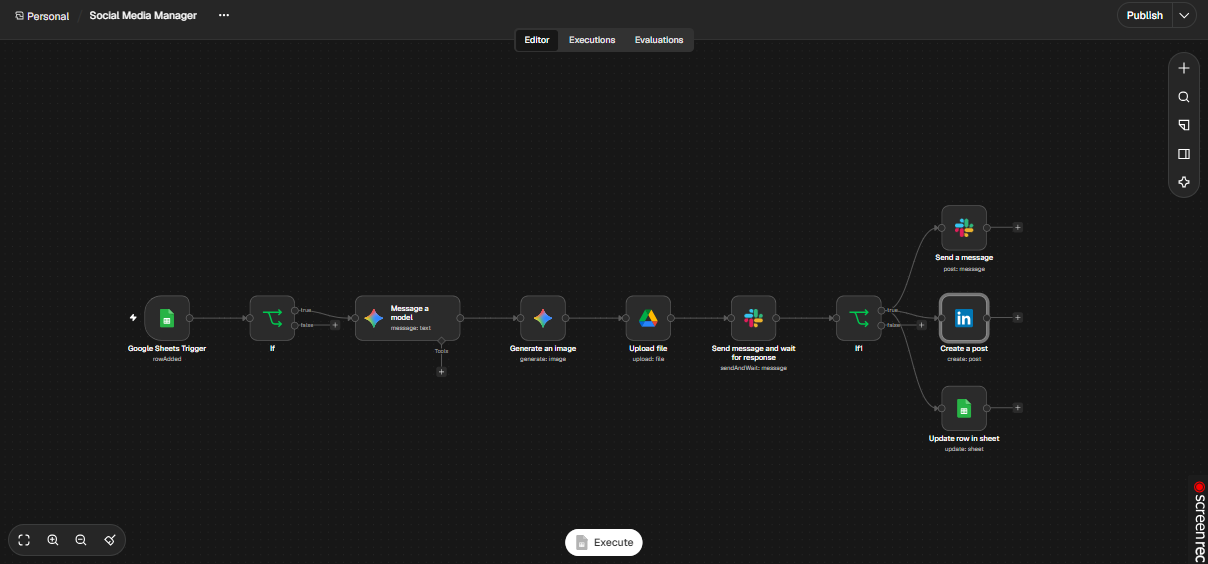
Human approval first. Nothing is posted until a person approves it in Slack.
What the workflow shows
- A Google Sheets trigger that starts from one new row.
- Two AI steps, one for text and one for the image.
- A send-and-wait approval in Slack, and three actions after approval.
A good fit for
- Founders and small businesses that want to post every week
- Marketing teams that need an approval step
- Agencies that run content for clients
Want something like this for your business?
Tell me what slows your team down. I will tell you whether it can be automated and how it would work.
mujtaba078123@gmail.com · Karachi, Pakistan (UTC+5)