Email automation
Auto Email Reply System
Sorts incoming emails into orders and inquiries and saves AI-written replies as drafts.
The problem
Orders and general questions land in the same inbox. When replies are slow, customers go somewhere else.
The solution
When a new email arrives, the workflow decides whether it is an order or an inquiry, asks Gemini to write a fitting reply, and saves it as a Gmail draft. A person checks the draft before sending, so nothing goes out unreviewed.
How it works
- A new email arrivesThe Gmail trigger starts the workflow.
- The email is sortedA text classifier with a Gemini model decides whether it is an order or an inquiry.
- A reply is writtenA Gemini message node writes a reply that suits that type.
- The reply becomes a draftA Gmail node saves it as a draft, so a person can check it before sending.
See it working
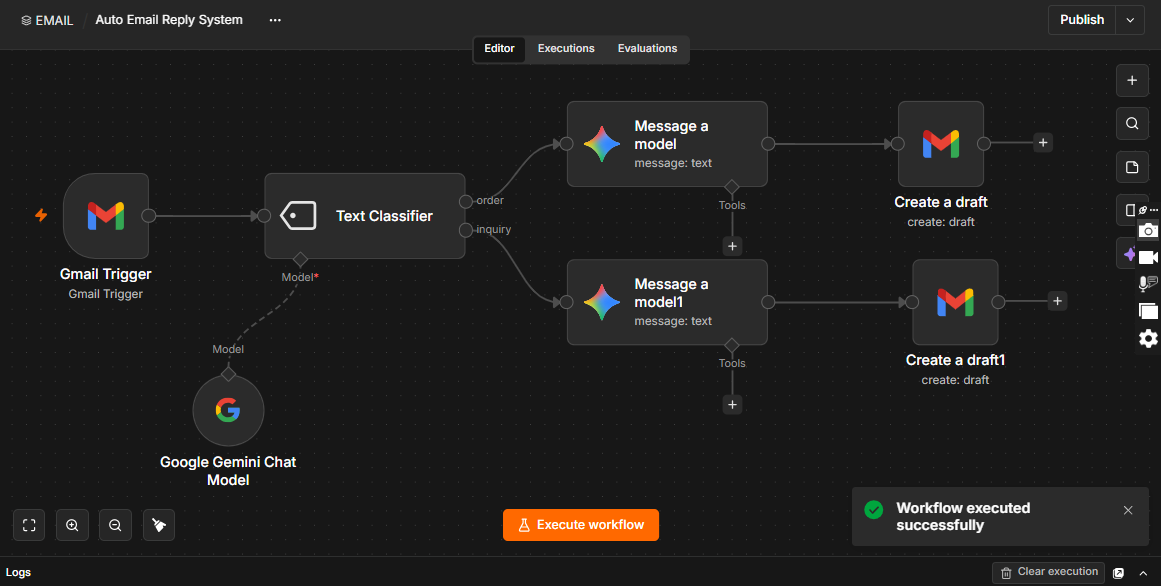
What the demo shows
- A completed run, confirmed by the “Workflow executed successfully” message.
A good fit for
- Shops and service businesses with a shared inbox
- Sales and support teams
- Anyone who answers the same kinds of email every day
Want something like this for your business?
Tell me what slows your team down. I will tell you whether it can be automated and how it would work.
mujtaba078123@gmail.com · Karachi, Pakistan (UTC+5)