Sales · Lead handling
AI Lead Qualification
Enquiry form to Google Sheets to a personalised AI reply with response buttons, sent by Gmail.
The problem
Any business that takes enquiries through a web form has the same issue. Someone has to copy each lead into a sheet, read it and write back, so leads wait for hours and some are forgotten.
The solution
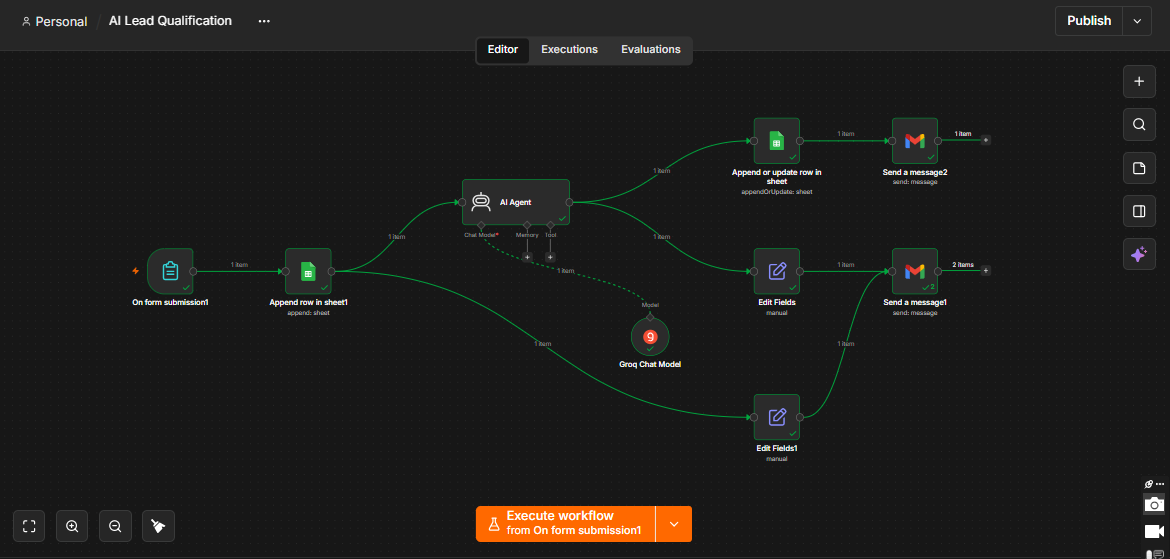
A visitor fills in an enquiry form; the demo is a course enquiry form. The workflow saves the lead in Google Sheets, an AI agent reads the enquiry and writes a personalised reply, and Gmail sends it. The email carries buttons so the lead can answer “Yes, I am interested”, “Yes, I am still interested” or “I am not interested”.
How it works
- A visitor submits the formThe enquiry form collects name, email, course, contact number and a message.
- The lead is savedThe workflow adds a new row to a Google Sheet, so every enquiry is recorded.
- The AI agent writes a replyAn AI agent with a Groq model reads the enquiry and writes a personalised message.
- The reply is stored and sentThe message is saved next to the lead in the sheet and sent by Gmail.
- The lead answersThe email has three response buttons, so the business sees who is interested.
See it working
What the demo shows
- A test enquiry form filled in with name, email, course, contact number and message.
- The new lead appearing in the Leads sheet, with a column for the AI message and a column for status.
- A personalised email in Gmail about the course the lead asked about, with three response buttons.
A good fit for
- Training institutes and schools
- Clinics and other service businesses
- Agencies and sales teams
- Any office that takes enquiries through a form
Want something like this for your business?
Tell me what slows your team down. I will tell you whether it can be automated and how it would work.
mujtaba078123@gmail.com · Karachi, Pakistan (UTC+5)